
Automate your customer feedback from your support tickets.
Embed our 1-click rating buttons to your Team Support messages.
Measure your team’s performance with data-driven decisions.
Test us out for free. Plans from $29/month – see pricing

Include an embedded rating button on your TeamSupport ticket
Let your customer click (or tap) on the satisfaction survey icon rating your staff performance.
The feedback can be followed in real-time on your dashboard. Analyse the data and improve your service.
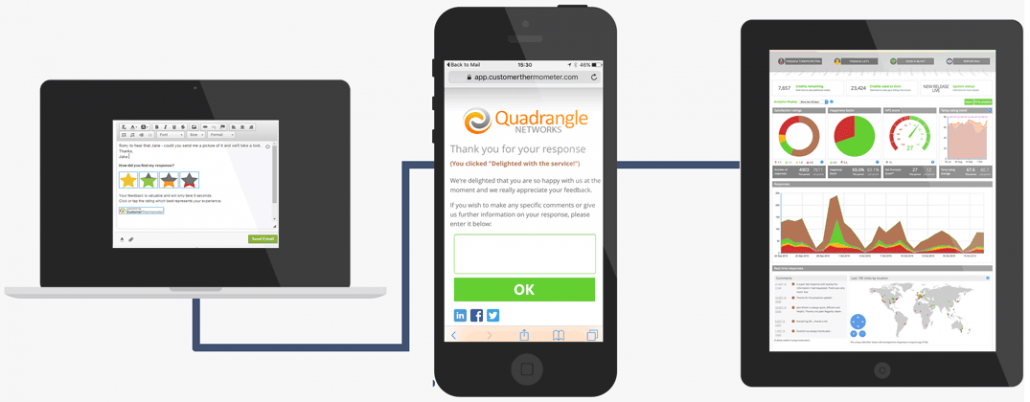
1) INSERT RATING BUTTONS INTO TEAMSUPPORT
Embed a question in your ticket
Insert rating icons
Receive instant feedback on your dashboard
2) DETAILED SATISFACTION FEEDBACK
Track and follow your customer ratings
Include a custom thank you landing page
Add a comment box to receive more detailed feedback
3) CUSTOM REPORTS & LIVE ANALYTICS
Track your customer support team performance
Respond to customers in real-time
Look for trends and analyse feedback in-depth
-
TIME-EFFICIENT FEEDBACK METHOD
Using less time from your customer to give you their feedback will increase the chances of getting it. Simplify the feedback method with only 1-question survey embedded in your support tickets.
-
MOBILE FRIENDLY PLATFORM
TeamSupport works wonders on mobile devices that why Customer Thermometer wants to empower you and your users with a survey tool that works on all devices.
-
SIMPLE FEEDBACK MECHANISM
Your team has to be prepared for both good and bad feedback. Embedding Thermometers in support emails gives them a simple mechanism to help them to help you.
Check what TeamSupport + Customer Thermometer can do

Improve your customer service
with TeamSupport & Customer Thermometer.
Use your current ticket automation workflow to get more feedback.
Simplify the feedback process for your customers and let them rank your service from the same email (no link)
“Thank you” landing pages can be incredibly useful. Create your own with Customer Thermometer and allow your users expand their comments
Receive in real-time notifications when a customer gives you bad feedback. React immediately to problems and retain your customers.
One question is more than enough. Narrow down to the essentials and ask the right question.
Include the best rating buttons for you. You can also upload your own button designs.
Use embedded surveys in different workflows. Maximise your impact with A/B testing
Receive new alerts every time you get feedback on both mobile and desktop
Analyse progress and trends from your dashboard
More features?
Yes, that’s right. We thrive on simplicity – but there’s plenty of options for you to explore with your team.
Find out all about our feature set – click the button below.
FeaturesTeamSupport integration guide
Now that you are part of the Customer Thermometer community is time to get your feedback machine up and running.
Take a look at our simple integration guide for TeamSupport.
Integration instructions

“It took literally 10 minutes to implement and immediately started to deliver valuable results. I think it’s a huge positive for both our customers and our team.”
Matt Casey, Customer Operations, Moonfruit
Integrate Customer Thermometer in other platforms
Get even more feedback when you plugin our survey tool to other platforms that you use. See the full list below
To see all of our integrations click here




TeamSupport’s new best friend. Your first 10 surveys are on us.
Set up a new free account and get more feedback from day one.
-
No credit card required
Once you’ve tested us out, upgrade and receive a monthly credit allowance.
-
Fully functional account
Start sending surveys which get results, in the next 10 minutes.
-
Be prepared for your response rate
Take action on all your feedback – you might be surprised just how much you will get.