
Email Surveys
The only email survey which proactively alerts you to unhappy customers.
Plans start from $29/month – see pricing. Test us out for free.
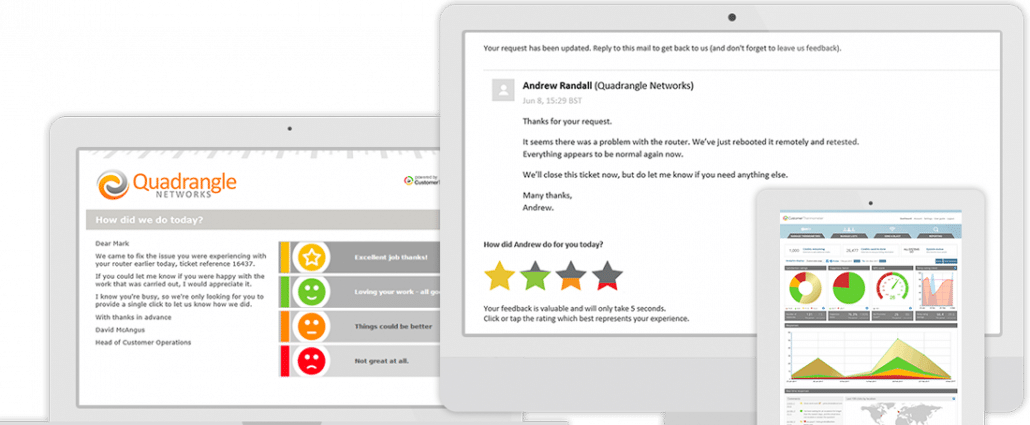
This is an Email Thermometer.
Ask one question with up to four possible responses. Upload your contact data and send a Blast or trigger sending via our API.
This is an Embedded Thermometer.
Connect your feedback buttons to your favorite helpdesk / CRM application. Use your 3rd party to manage contact data and send.
Industry leading response rates.
Identifiable feedback. Verbatim comments, NPS and trend reporting.
Email Feedback in just 1-click
Customer Thermometer is a 1-click email feedback tool.
Long, boring surveys don’t work any more
Who has time to answer a customer satisfaction survey these days?
Don’t settle for anonymous feedback with a sub-5% response rate.
Customer Thermometer is proven to reduce customer churn.
Send yourself one of our email surveys right now —>
Experience a survey for yourself:
How to Email a Survey
Here’s how easy it is to create and send an email survey with Customer Thermometer.
- Sign up for our free trial account which gives you 10 free surveys.
- From your new account, customize your email template and upload your recipients along with any associated data, such as Account manager, customer type etc. Free templates are preloaded into your account to get you going.
- Customer Thermometer then sends your 1-click emails and gathers your survey results.
It really is that simple and generally takes new users less than 5 minutes to setup their first email surveys.
Send our one click email feedback survey your way

We send – via email
Create your template, ask one question. Setup (up to) four possible answers. Customise your landing page. Upload your contact list.
Sit back and enjoy finding out how your customers are really feeling.

Embed survey in email
Decide on your question. Create up to four possible answers. Customise your landing page. Embed into your CRM or Helpdesk service.
Sit back and enjoy finding out how your customers are really feeling.

Embed email survey in Outlook / Gmail signatures
Setup your footer question. Decide on your four 1-click icons to use. Customise your landing page. Embed in your email footer.
(In this mode only, we prompt recipients for their email address.)
6,000+ Users trust us. All these brands use our email survey.





Identifiable feedback
Everyone makes mistakes. It’s how you fix them that matters.
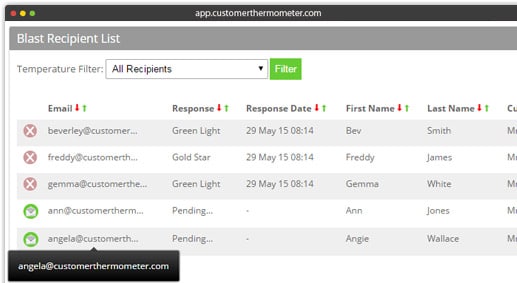
When a feedback button is clicked – you will know exactly who’s clicked it.
Now, you have the power to follow up quickly if there’s a problem and make things right.
The traditional annual customer satisfaction survey with 20 questions is no longer valid in today’s fast paced world.
Build your processes around Customer Thermometer’s email survey software and never lose another customer.
Email survey software with industry leading response rates
Most customers are very happy to provide feedback. How you ask for that feedback that determines how much you’ll get.
Ask the question that really matters. “How did we do for you?” or “How are you feeling about working here?”
When your recipient has clicked, they can leave a comment on your branded landing page if you want.
Takes seconds to answer. Can be answered on any device. No wonder our response rates are ripping up industry averages.
How to Make an Email Survey
If someone is unhappy with a service or product they’ve bought from you, you want to know… and you want to know fast. There’s a time-limited opportunity to make a difference, while the person’s experience is still fresh in their mind. Thanks to our email surveys you can do exactly that, catching unhappy customers before it’s too late, then doing whatever it takes to make them happy again.
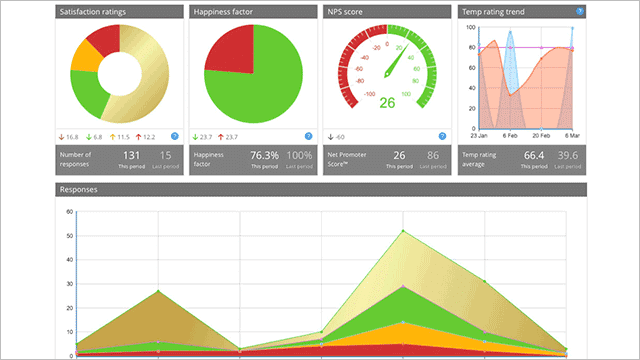
It’s also a pattern-identification thing. On a larger scale, examining the data returned by our surveys delivers all sorts of exciting insight into what people are feeling in general, and how to improve the overall customer experience. It’s also important to know when people are happy, of course. We do that, too. No wonder our email based surveys are so popular.
Embedding email surveys the Customer Thermometer way
Do any of these statements sound familiar?
- We’ve just seen a mass customer exodus – help! What’s gone wrong?
- We get the feeling some of our customers are not 100% happy, but we’re not sure who or why.
- We use surveys to monitor customer happiness, but our response rates are really low.
- It takes too long to set up customer surveys, and it’s far too complex.
If so, your business would benefit from the intelligence provided by Customer Thermometer’s email surveys.
Three ways to harness our email survey tool for better customer experiences
Did you know you can use our tools to embed email surveys in three different ways?
- We send a survey for you via email – All you do is create a template, ask one simple yet powerful question, pin down four answers for people to choose from, customise a special landing page and upload your contact list. We do the rest for you. You’ll soon know for sure how your customers are feeling.
- Embed your survey in a CRM, Helpdesk or third party app – Use the same simple procedure to create and embed a powerful survey into your Customer Relationship Management system or Helpdesk. It’s surprisingly difficult for people to resist responding. Here’s a list of the many apps we integrate with.
- Embed a survey in Outlook or Gmail signature – Set up a question for your footer, choose relevant icons, customise a landing page then embed the survey in the email footer like a pro. And grab recipients’ email addresses while you’re at it.
Simple to create, easy to embed, a dream for customers to use
We do the tricky bit, you do the fun bits. Customer Thermometer builds surveys for you. All you do is customize a template and make a landing page. It’s really simple. So simple, in fact, that as long as you can use Microsoft Word you’ll be able to grasp the system in no time.
Just give it five minutes and you’ll be fluent, easily setting up a survey in the Manage Thermometers area. Then you can edit it any time you like.
- First build your Thermometer, then create the landing page or pages – we’ve provided some simple instructions down the page.
- If you’re making an embedded Thermometer, our system generates a chunk of html code to paste into your email template.
- If you’re building an Outlook or Gmail signature survey, we generate the icons and links for you.
- If you’re sending an email Thermometer, all you do is make a contacts list inside your account and we’ll send it for you.
16 Simple steps to build an email Thermometer
Here’s a detailed checklist that will help you to set up your first Customer Thermometer survey by email.
- Click ‘manage thermometers’ and ‘add new thermometer’.
- Name your Thermometer.
- Decide on a question to ask.
- Enable Net Score Reporting if you want to – it’s optional.
- Create a subject line.
- Add a salutation – also optional.
- Upload your email text.
- Choose your icons.
- Name your temperature ratings, for example hot, warm, cool or cold.
- Add a logo if you like.
- Choose a title bar color.
- Add the name of the person the email’s from.
- Add your email reply-to address.
- Choose optional email alerts.
- Preview your Thermometer.
- Send a test, and you’re off!
How to create tailored landing pages in 7 quick steps
- Create a heading for the page.
- Include click confirmations and thank-you text to thank people for their response.
- Ask for extra comments – it’s optional.
- Add social media buttons.
- Upload your logo and images.
- Choose a footer image.
- Pick a background color and you’re ready to send people to your landing page.
Watch videos, read practical user guides
Would you like to see our brilliant applications at work? We’ve created a video to give you a deeper insight, which you can watch here.
We’ve also made a video specifically covering Outlook email signature survey instructions, which you can see here, and one for Gmail signature surveys, here. They’re slightly different simply because of the different ways the email systems themselves work. Plus there’s a general user guide to email Thermometers here.
Creating stickiness, driving advocacy
Sticky people are happy people. To keep people happy, you need to know what they’re feeling in the first place. That’s what our email signature surveys do: reveal exactly how your customers feel at a given point in time. If they’re not happy, you can dive right in and take action.
Sticky customers are your best customers. The stickier they are, the more likely they are to become an advocate of your business, someone who’s so thrilled with the things you do and the way you do them that they tell their friends, family and everyone else about it.
Advocates are much more likely to return and buy the same things again, buy more next time, buy completely different things from you, and recommend people in their networks use you. As you can imagine, up-selling and cross-selling to advocates is a marketer’s dream. But first you need to know who they are. Our customer feedback email surveys help you pin down those vital individuals.
Take our embedded Thermometer tour
Want to take a tour of our embedded Thermometers? It’s inspiring! Check out our embedded Thermometer tour here. If you have any questions, we’re always pleased to help.