
Turn HappyFox workflow into a customer feedback machine.
Add 1-click satisfaction buttons to your Happyfox tickets.
Happier customers with less effort.
Test us out for free. Plans from $29/month – see pricing
Your customer support team resolves a query and triggers an automatic response from Happyfox. Your message will have embedded a 1-question survey and the customer will click (or tap) an icon to show their satisfaction. You will receive that feedback immediately. Analyse, measure and react to that data from your private dashboard.
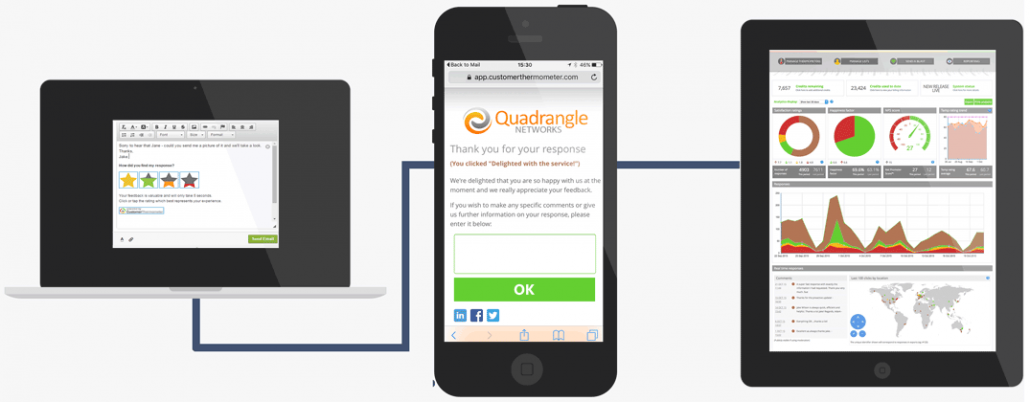
1) EMBED RATING BUTTONS INTO HAPPYFOX
Insert a question for your survey. Include your choice of ratings icons. Get ready to receive loads of feedback!
2) RECEIVING CUSTOMER FEEDBACK
One click is all your customers need to give you feedback. Measure your customer support performance.
3) LIVE ANALYTICS & DATA COLLECTION
Analyse your customer feedback. Follow the progress of your customer teams. Be aware of new trends and create reports.
-
RESPECT YOUR CUSTOMERS’ TIME
20 question surveys are long gone and even if you add a link to follow for a survey the response rates aren’t good at all. One quick question embedded in your email will avoid all time concerns.
-
LET THEM RESPOND ON ANY DEVICE
Customer Thermometer works on all devices making your user decide where they feel more comfortable giving their feedback.
-
MAKING IT SIMPLE TO GIVE FEEDBACK
Your customers want to give feedback – both good and bad. Embedding Thermometers in support emails gives them a simple mechanism to help them to help you.
Happyfox + Customer Thermometer in action

Retain your customers and improve your support. Make data-driven decisions for your business.
- Trigger ticket email from Happyfox with a 1-question survey to rate your customer support.
- Avoid the “click to answer survey” link. Ask for feedback during thread or on ticket solved.
- Ask for detailed feedback on a custom landing page. Additional comments are important too.
- Report the feedback to your support team and improve it with data-driven decisions.
- Embed the question that makes more sense to your support team.
- Choose the rating buttons that combine better with your brand message.
- A/B test different ways to use our customer satisfaction surveys. Use it in different cases and workflows.
- Be alerted to ratings via email and/or iPhone/Android alerts.
All of our survey features explained
Discover even more awesome features. Find out why so many companies are combining Happyfox with Customer Thermometer to get great results.
FeaturesHappyfox satisfaction survey integration guide
Find in our step by step video guide how simple it’s to integrate our satisfaction surveys.
Integration instructions“It took literally 10 minutes to implement and immediately started to deliver valuable results. I think it’s a huge positive for both our customers and our team.”
 Matt Casey, Customer Operations, Moonfruit

Discover more web applications that you can connect with Customer Thermometer
Connect other services that you currently use to increase even more the amount of feedback from your users.





Try us on Happyfox. Your first 10 surveys are on us. Set up a free account with us and start getting feedback.
-
No credit card required
Once you’ve tested us out, upgrade and receive a monthly credit allowance.
-
Fully functional account
Start sending surveys which get results, in the next 10 minutes.
-
Be prepared for your response rate
Take action on all your feedback – you might be surprised just how much you will get.