
Add our simple Salesforce Desk survey to your Case tickets
1-click feedback your customers will love
(And you will love too).
Try Customer Thermometer free. Plans start at $29/month – pricing
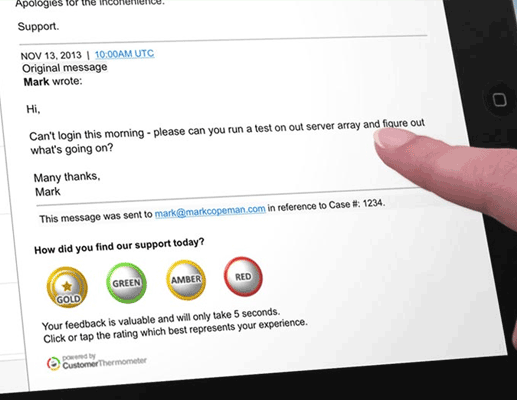
Embed simple smileys or rating stars into the emails you send to customers from Desk.com.
Customers click from within the email to give their rating and can leave a comment.
Feedback appears in real time on your dashboard, and the agent and their manager can be emailed an alert too.
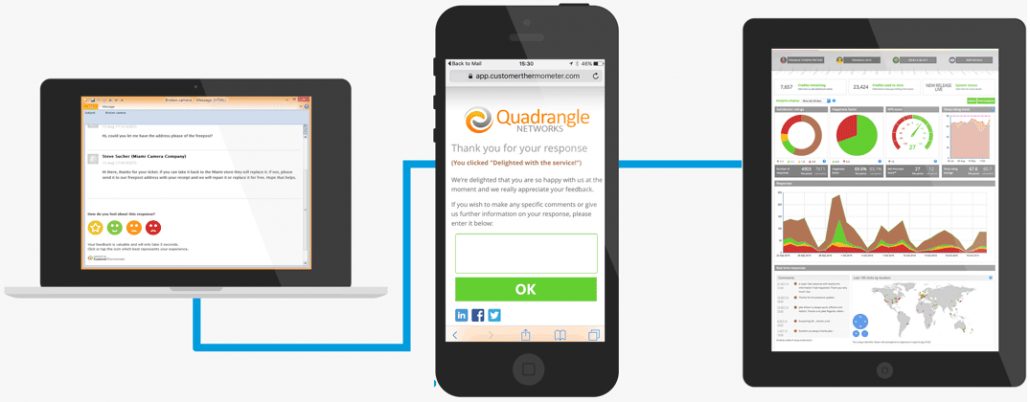
1. ADD YOUR BUTTONS TO SALESFORCE DESK
Pick your buttons / or upload your own
Get customer feedback instantly
Even DURING the lifetime of a Case, or on Case closed
2. CUSTOMERS CAN CLICK AND COMMENT
Customize the comment capture pages
Direct happy customers to social media
Track responses against real customers
High response rates because it’s so easy
3. SENSE AND RESPOND TO YOUR FEEDBACK
Rate your support agents by customer sat
Get back to customers in real time
Compare trends and analyze changes
See recurring themes in our comment cloud
-
DOESN’T BURDEN YOUR CUSTOMERS
Your customer feeds back from right within the email. The days of long surveys are long gone.
-
FULLY MOBILE
Customers can give you feedback from anywhere in the world. Customer Thermometer works across all devices, including mobile.
-
MICRO SURVEYS CUSTOMERS CAN’T RESIST
By making it easy for customers to give you feedback, you’re helping them to help you.

Salesforce Desk surveys made easy. The details…
Emails you send from Salesforce Desk can be rated directly from within the ticket. No more the “click to complete survey” links. Get customer feedback during thread or when ticket is closed
Customize the landing page that thanks customers for their feedback with your own logo and wording, and ask for a comment (optional)
See a list of all comments associated with the satisfaction ratings, and a comment cloud too. You can also export them to share with your team
Pen your own satisfaction question, and personalize by agent: “How did Paul do for you today?”
Use our library of awesome ratings icons, or design use your own unique ones.
Get instantly alerted to feedback via email and mobile alerts
Track improvements and spot trends across departments, countries, agents and more
Enjoy unique feedback routes for different parts of your workflow – also works for foreign languages
You’ll get superb response rates and a high verbatim comment percentage too

“We use Customer Thermometer to measure all of the interactions we have with our support cases. Any time someone reaches out to us they will be given the option to let us know how satisfied they were with their interaction.”
Nichole Jordan,
VP Customer Success, AnyPerk
 Watch the case study